Skip to content
Product

Find the Aurora Surface That Fits the Work in Front of You

Start from the review, readiness motion, accountability queue, or regulated-proof requirement you need to handle next, then add modules only when the workload justifies them.
Live product preview
See the proof system teams open first

Start with the workflow tied to your next review, then keep reviewer operations, enterprise controls, readiness records, and premium Command tied back to the same proof record.

Choose by your next deadline

Start with the Walkthrough That Matches Your Next Review

Tell us the review, renewal, or deadline in front of you. Aurora points to the best first walkthrough and the proof outputs you will need next.

Best fit by review type

Choose the Review in Front of You

Pick the deadline, request, or review in front of you. We'll show the first walkthrough to open, the capability to start with, and what to look at next.

Start with control mapping and evidence freshness so your first review cycle has clear ownership and reusable proof.

Open a walkthrough first

Try the Product Before You Book Time

Open governance, evidence, trust, readiness, and operations tours on your own schedule, then bring your real workflow when you want guided time.

No account requiredFull interactive tours
Aurora evidence workspace showing artifact freshness, ownership, and source traceability.
Evidence Workspace
Aurora trust center with published proof surface and controlled sharing.
Trust Center

Core capabilities

Start With the Capability That Solves the Review in Front of You

Aurora keeps governance, evidence, reviewer sharing, readiness, and response connected - but you can start with the capability that solves the request, deadline, or review in front of you.

Assessments
Answer security questionnaires faster with cited, pre-approved language that stays consistent across reviews.
What you can show: Approved answers with citations, reviewer packages, and response history
Use it when: Security reviews and questionnaires
Evidence
Track every artifact by source, owner, and schedule so nothing drifts out of date between reviews.
What you can show: Source-verified evidence with timestamps, ownership, and export history
Use it when: Keeping evidence reusable between reviews
Governance
Move policies from draft through approval with versioned records and clear ownership at every stage.
What you can show: Policy records with approvals, version history, and review context
Use it when: Written program and audit trails
Risk
Register risks, track exceptions, assign remediation owners, and run vendor due diligence -- all from a single workspace.
What you can show: Risk decisions, remediation history, and vendor review records
Use it when: Decision trails and vendor oversight
Trust Center
Give reviewers controlled access to exactly what they need, with full audit trails and expiring links.
What you can show: Reviewer portals, curated collections, and access logs
Use it when: Controlled sharing without oversharing
Enterprise Controls
Centralize SSO, SCIM, API keys, scoped access, and reviewer-safe governance controls for larger operating footprints.
What you can show: Provisioning controls, scoped access, API credentials, and governed workspace boundaries
Use it when: Larger teams that need centralized identity, access, and operating guardrails
Support Requests
Structured request intake with owner assignment, threaded replies, status transitions, and private team notes.
What you can show: Request timelines, assignment history, and response records
Use it when: Operational triage and reviewer follow-up
Messaging Operations
Messaging workflows with acknowledgment timelines, escalation history, and clean communication records.
What you can show: Communication timelines, acknowledgment history, and escalation records
Use it when: Operational messaging, escalations, and audit-ready communication records.
Readiness Analytics
Score readiness across exercises and campaigns so your team can prove measurable improvement.
What you can show: Program scorecards, trend snapshots, and cohort comparison reports
Use it when: Proving readiness improvement over time
Readiness Suite Bundle
Bundle Workforce Readiness and Response Readiness when outside reviewers need one clean story for people, exercises, incidents, and communications.
What you can show: One connected readiness lane with training, exercises, incidents, communications, and measurable improvement.
Use it when: Teams that need to show people readiness and response readiness together without fragmenting the record.
Aurora Copilot
Draft answers grounded in your evidence - with human review and approval before anything ships.
What you can show: Draft answers with citations, approvals, and reuse trails
Use it when: Faster drafting without losing control
Simulations & Sessions
Run facilitated exercises and capture session outputs, follow-up ownership, and reusable readiness records.
What you can show: After-action records, training completion logs, and readiness history
Use it when: Scenario-based exercises, renewal readiness, and defensible session history
Command
Collect infrastructure evidence from scoped read-only collectors (early access).
What you can show: Immutable snapshots, drift signals, and infrastructure evidence history
Use it when: Infrastructure-level evidence collection
Implementation & Success
Keep onboarding, launch, deployment help, and premium support explicitly priced so service work stays visible and predictable.
What you can show: Launch plans, deployment guidance, premium support coverage, and clear commercial operating rules.
Use it when: Teams that want guided rollout, renewal clarity, or premium support without burying service work inside software pricing.

Need a fast recommendation?

Tell Us About the Work in Front of You. We’ll Point to the Best Starting Capability.

If you already know the questionnaire, audit, renewal, or procurement cycle in front of you, we can map the shortest path to the outcome Aurora should produce first.

Choose your starting point

Open the Product Surface That Best Fits the Work in Front of You

Each capability has one best first stop. Start there, then add connected workflows only when the request expands.

Governed Proof
Best entry point

Start on Assessments when this is the fastest path to the proof, approval trail, or reviewer handoff you need next.

Common next steps: Evidence, Governance, Risk, plus 2 more supporting surfaces.
Continuous Compliance
Best entry point

Start on Evidence when this is the fastest path to the proof, approval trail, or reviewer handoff you need next.

Supporting walkthroughs are available when the request expands.
Enterprise Controls
Best entry point

Start on Enterprise Controls when this is the fastest path to the proof, approval trail, or reviewer handoff you need next.

Trust Center
Best entry point

Start on Trust Center when this is the fastest path to the proof, approval trail, or reviewer handoff you need next.

Risk Register
Best entry point

Start on Risk when this is the fastest path to the proof, approval trail, or reviewer handoff you need next.

Supporting walkthroughs are available when the request expands.
Ask Aurora
Best entry point

Start on Assessments when this is the fastest path to the proof, approval trail, or reviewer handoff you need next.

Common next steps: Aurora Copilot.
Vendor Risk
Best entry point

Start on Risk when this is the fastest path to the proof, approval trail, or reviewer handoff you need next.

Supporting walkthroughs are available when the request expands.
Risk & Accountability
Best entry point

Start on Risk when this is the fastest path to the proof, approval trail, or reviewer handoff you need next.

Common next steps: Support Requests, plus 1 more supporting surfaces.
Messages Operations
Best entry point

Start on Messaging Operations when this is the fastest path to the proof, approval trail, or reviewer handoff you need next.

Supporting walkthroughs are available when the request expands.
Workforce Readiness
Best entry point

Start on Readiness Analytics when this is the fastest path to the proof, approval trail, or reviewer handoff you need next.

Common next steps: Simulations & Sessions, plus 4 more supporting surfaces.
Practice Readiness
Best entry point

Start on Simulations & Sessions when this is the fastest path to the proof, approval trail, or reviewer handoff you need next.

Supporting walkthroughs are available when the request expands.
Phishing Readiness
Best entry point

Start on Simulations & Sessions when this is the fastest path to the proof, approval trail, or reviewer handoff you need next.

Supporting walkthroughs are available when the request expands.
Training Leaderboard
Best entry point

Start on Readiness Analytics when this is the fastest path to the proof, approval trail, or reviewer handoff you need next.

Response Readiness
Best entry point

Start on Simulations & Sessions when this is the fastest path to the proof, approval trail, or reviewer handoff you need next.

Supporting walkthroughs are available when the request expands.
Readiness Suite Bundle
Best entry point

Start on Readiness Suite Bundle when this is the fastest path to the proof, approval trail, or reviewer handoff you need next.

Supporting walkthroughs are available when the request expands.
Incident Response
Best entry point

Start on Simulations & Sessions when this is the fastest path to the proof, approval trail, or reviewer handoff you need next.

Supporting walkthroughs are available when the request expands.
Emergency Messaging
Best entry point

Start on Messaging Operations when this is the fastest path to the proof, approval trail, or reviewer handoff you need next.

Supporting walkthroughs are available when the request expands.
Response Tickets
Best entry point

Start on Support Requests when this is the fastest path to the proof, approval trail, or reviewer handoff you need next.

Command Insight
Best entry point

Start on Command when this is the fastest path to the proof, approval trail, or reviewer handoff you need next.

Command Control
Best entry point

Start on Command when this is the fastest path to the proof, approval trail, or reviewer handoff you need next.

Implementation & Success
Best entry point

Start on Implementation & Success when this is the fastest path to the proof, approval trail, or reviewer handoff you need next.

Supporting walkthroughs are available when the request expands.

Module families

See How Products Combine into the Commercial Families Buyers Actually Buy

Aurora sells one proof system with clear module families around it. These cards show the quickest commercial fit, what operators get, what reviewers receive, and how the public bundles map back to the underlying product surface.

Start here
Platform Core
Proof Core
Governance, evidence, assessments, reusable answers, reviewer controls, and enterprise controls tied together in one governed base.
What operators get

One place to manage controls, approvals, evidence, audit outputs, and review-project history.

What reviewers get

A cleaner trust surface, structured exports, and logged access instead of loose attachments.

When the next ask is external
Reviewer Operations
ReviewOps
Trust Center, reviewer tiers, packs, questionnaires, messages, and access logs built for buyer, auditor, insurer, and partner handoff.
What operators get

Request routing, approval gates, scoped sharing, and the audit trail of what was shared.

What reviewers get

Clear access paths, cleaner exports, and less back-and-forth to get the proof they asked for.

When procurement starts reading closely
Enterprise Controls
Proof Core
RBAC, SSO, SCIM, service accounts, IP allowlisting, multi-entity scoping, audit-period diffs, exports, and sinks that stay included instead of hidden.
What operators get

Identity, access, export, and auditability controls that keep the operating side safe as the program grows.

What reviewers get

Cleaner review windows because exports, diffs, and scoped sharing stay tied to named controls instead of ad hoc admin work.

When evidence needs to stay current
Continuous Compliance
Automation
Read-only integrations, evidence freshness, drift visibility, endpoint proof, and connector-backed collection.
What operators get

A live view of what is current, stale, missing, or drifting before the next review hits.

What reviewers get

Proof with clearer freshness, source context, and less manual clean-up behind every export.

When follow-up becomes the work
Risk and Accountability
ReviewOps
Risk register, remediation, vendor diligence, support requests, messages, and accountable operational follow-through.
What operators get

Clear owners, dates, escalations, and closure evidence instead of scattered remediation threads.

What reviewers get

Decision trails and closure outputs that make progress easier to verify.

When people need proof too
Workforce Readiness
ReadyOps
Training, build-your-own content, acknowledgments, phishing, and practice oversight mapped back to the same governed record.
What operators get

One system for assignments, acknowledgments, custom training, and practice oversight instead of scattered LMS screenshots and spreadsheets.

What reviewers get

A clearer story of who trained, what they acknowledged, and how readiness is improving over time.

When exercises and incidents matter
Response Readiness
ReadyOps
Tabletops, sessions, incidents, playbooks, advisory requests, emergency communications, and readiness analytics tied back to the same proof graph.
What operators get

A response lane with exercises, incident records, follow-up owners, and measurable readiness movement in one place.

What reviewers get

A concrete story of what was practiced, what happened, and what changed after the response work closed.

When provenance is the buying criteria
Command
Command Enterprise
In-perimeter collectors, field coverage, encrypted snapshots, governed exports, and premium evidence for regulated or hybrid environments.
What operators get

Coverage validation and technical proof that can stay inside the environment while still producing reviewer-safe outputs.

What reviewers get

Higher-confidence answers to source trust, coverage, and change-control questions.

Reviewer handoff

Show Buyers the Path from Maintained Proof to Controlled Sharing

Aurora does more than generate files. It gives teams a believable reviewer handoff: current evidence, scoped access, and an activity trail you can explain later.

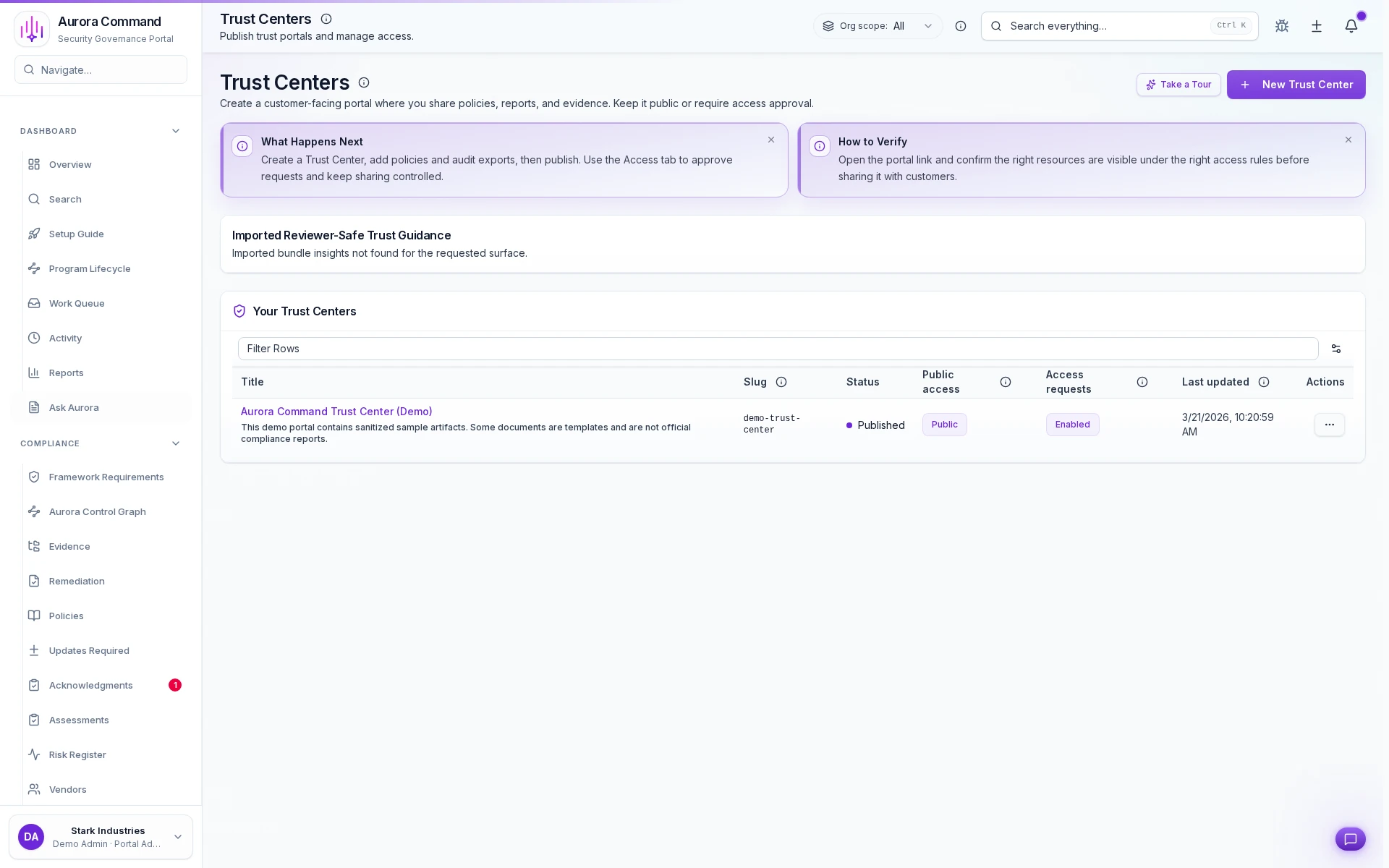
Aurora Command Trust Centers screen showing a published trust center with access requests enabled.
Published trust surface
Published proof surfaceControlled sharingNo loose attachments
Reviewer handoff

Deliver the right proof surface without last-minute document chasing

Start buyer reviews from a published, current proof surface instead of assembling a packet at the last minute.

  • Show the maintained trust surface buyers expect to see first.
  • Keep reviewer-facing materials tied to the same proof record your team updates.
  • Make follow-up requests easier because the first handoff already has structure.
See Trust Center
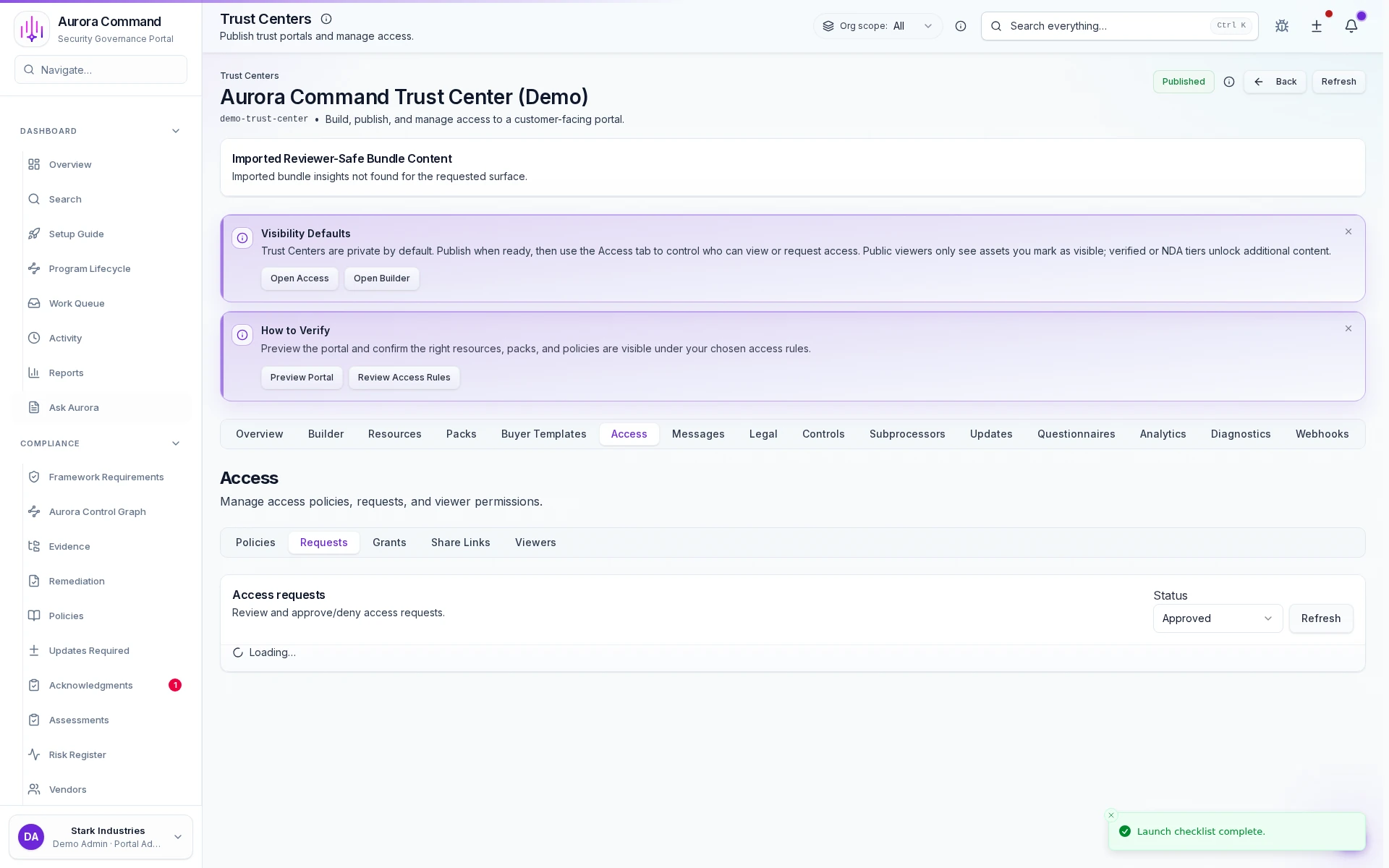
Aurora Command Trust Center access workflow showing access tabs, policies, and request handling.
Access workflow
Controlled accessAccess request workflowApproval gates
Trust Center access

Share proof through a controlled request-and-approval flow

Give procurement, diligence, and audit reviewers the right level of access without exposing the admin side of the program behind it.

  • Route sensitive materials through approval, agreement, or verification gates.
  • Keep access rules visible enough that buyers understand what happens next.
  • Make cross-domain reviewer sharing feel deliberate instead of improvised.
Explore access controls
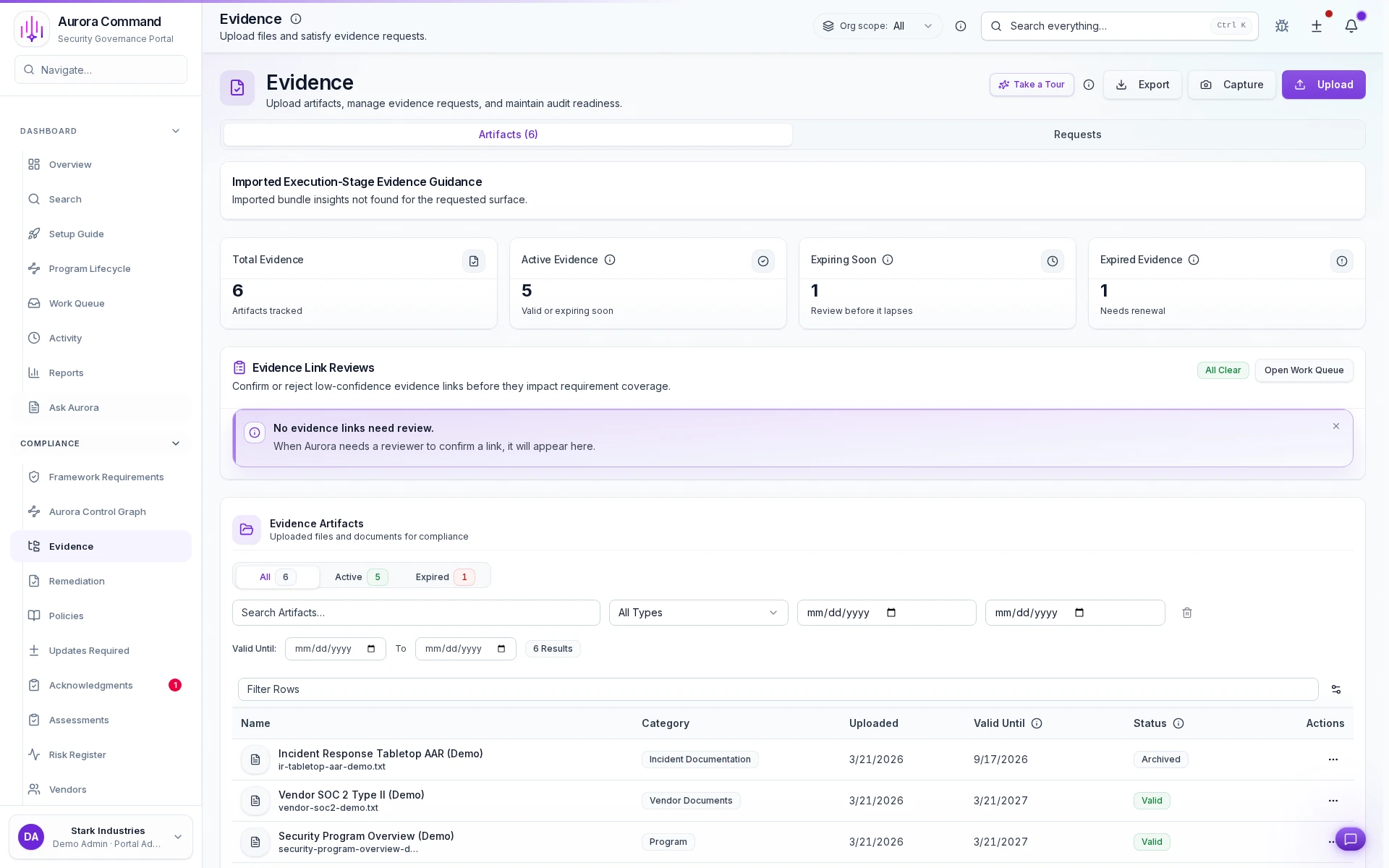
Aurora Command evidence workspace showing artifact freshness, status, and export actions.
Evidence workspace
Freshness statusSource traceabilityReview-ready structure
Maintained evidence

Keep the underlying proof current before anyone asks for it

Freshness, ownership, and source context stay visible in the evidence workspace so reviewer handoffs start from maintained proof.

  • See what is current, what is expiring, and what needs attention before a review starts.
  • Preserve source and category context so reviewers are not guessing what each artifact means.
  • Reduce last-minute cleanup because the evidence record is already organized.
See the evidence workspace
Activity trail

Keep Every Reviewer Touchpoint Attached to the Record

When someone requests access, gets approved, or opens a shared packet, Aurora keeps that trail on the same proof surface instead of burying it in inboxes.

  • Give security, procurement, and revenue teams one answer when they ask what was shared.
  • Show reviewers a controlled path instead of rebuilding the handoff each time.
Trust Center: Access log
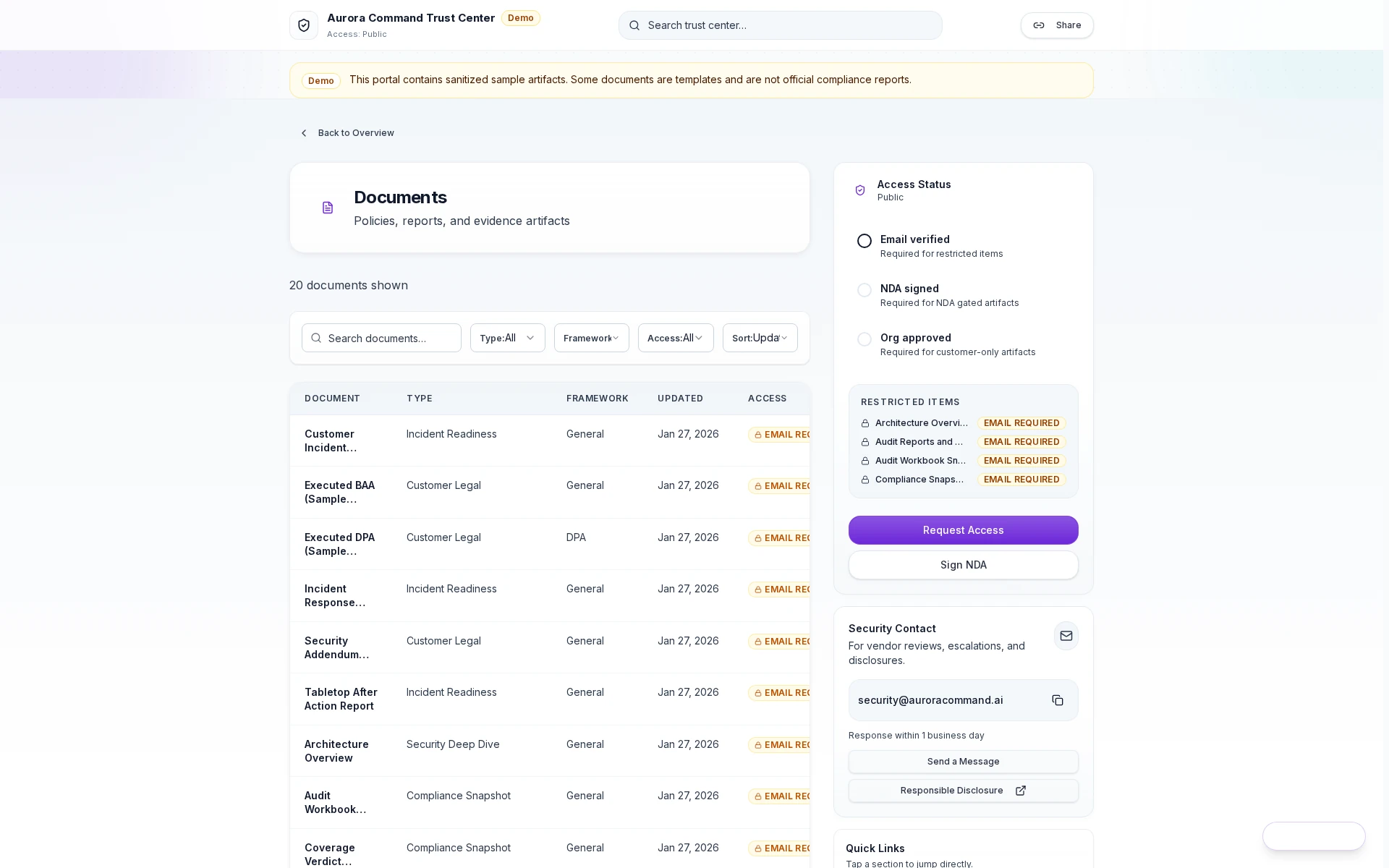
Aurora reviewer portal showing review access, exports, and logged activity.

Scoped access grants

Reviewers get controlled access with tiered permissions and expiring links.

Questions teams ask before they start

What Teams Want to Know Before They Choose a Starting Point

Do I need every capability on day one?
No. Start with the capabilities you need for your next deadline. Add automation and readiness as requirements grow.
Can we start with Platform Core and add modules later?
Yes. Most teams start with Platform Core for maintained proof, reviewer sharing, and enterprise controls, then add automation, readiness, accountability, or Command as the workload expands.
Can we start without integrations?
Yes. Start with manual evidence uploads and mapping, then automate collection with integrations when you are ready.
Do you support request and inbox workflows too?
Yes. Support Requests provides structured intake, owner assignment, status tracking, and threaded request history for operational follow-up.
Do buyers and auditors count as seats?
No. View-only access is included.
What do reviewers actually see?
Reviewers see what you publish through your Trust Center or in a reviewer package. They do not get access to the operating workspace behind it.
How do we share with reviewers?
Use Trust Center tiers for controlled access, agreement gates, expiring links, and access logging.
Does Aurora replace our GRC tool?
Aurora Command is built for running a program, keeping evidence current, and sharing it with reviewers. If you have a GRC tool, Aurora may complement it. If you are outgrowing spreadsheets, it replaces them.
What does early access mean for Command?
Command is available in early access. During a walkthrough, we’ll confirm fit for your environment and show what is available today.
Live walkthrough
Get a Capability Plan in 15 Minutes
Tell us about one upcoming audit, security review, renewal, or framework rollout. We’ll show the relevant capabilities, the controlled handoff path, and the shortest route to a governed proof workflow.
15-minute walkthrough. No obligation. We'll show Aurora applied to your workflow and show the exact outputs. (No compliance guarantees.)