Command: Full-Stack Compliance Operations
Command deploys scoped collectors inside regulated and hybrid environments, verifies coverage at the field level, and gates every export on quality, integrity, and reviewer readiness. Pull telemetry from Datadog, Splunk, GitHub, GitLab, Qualys, and Okta through governed collector paths.
- Collectors execute inside your perimeter:Evidence stays in your network. Only metadata and controlled exports leave the environment boundary.
- Coverage is verified at the field level:Device fleet, security posture, and agent status are validated before the package ships.
- Exports pass quality gates:Missing fields, stale telemetry, and incomplete coverage block the export until resolved.
- Insight and Control price separately:Evidence collection and governance deploy as distinct modules so you evaluate real scope.
Track collector deployment, device coverage, readiness gates, and export posture before any reviewer sees the evidence.
Regulated Evidence Fails When Provenance Stays Ambiguous
Screenshots and Ad-Hoc Exports Lack Provenance
Teams grab screenshots and export CSVs but there is no chain of custody, no capture timestamp, and no integrity verification. Reviewers have to trust the evidence on faith.
Coverage Claims Collapse Under Scrutiny
Teams claim full coverage but cannot prove it at the field level when a reviewer asks. Coverage percentage is a guess, not a verified metric.
Raw Evidence Leaves Without Quality Gates
Evidence gets exported as raw data dumps with no freshness check, no completeness verification, and no integrity hash. The export is whatever was available at export time.
This replaces screenshot-based evidence, unverified coverage claims, and raw exports without integrity verification or quality gates.
Two Modules. One Governed Evidence Path.
Command Insight
Base moduleThe evidence collection and verification layer. Deploy collectors inside your perimeter, validate coverage at the field level, and gate every export on quality.
- Scoped, read-only collectors inside your perimeter
- Field-level coverage validation per device and system
- Encrypted, timestamped evidence snapshots
- Collector attestation and health monitoring
- Coverage-gated export controls
Command Control
Add-on moduleThe governance and operational control layer. Governed actions, rollback, approvals, and higher-assurance operational control stay separate from the base evidence workflow.
- Governed actions: plan, apply, rollback
- Approval chain with complete audit trail
- Higher-assurance operational control
- Change log between review windows
- Separate commercial path for explicit scope
Deploy Insight first. Add Control when operational governance needs its own audit trail.
Five Steps from Scoped Collection to Governed Export
Start with one environment boundary and one collector lane. Expansion stays named and legible as scope grows.
Rollout, Coverage, and Export Readiness in One View
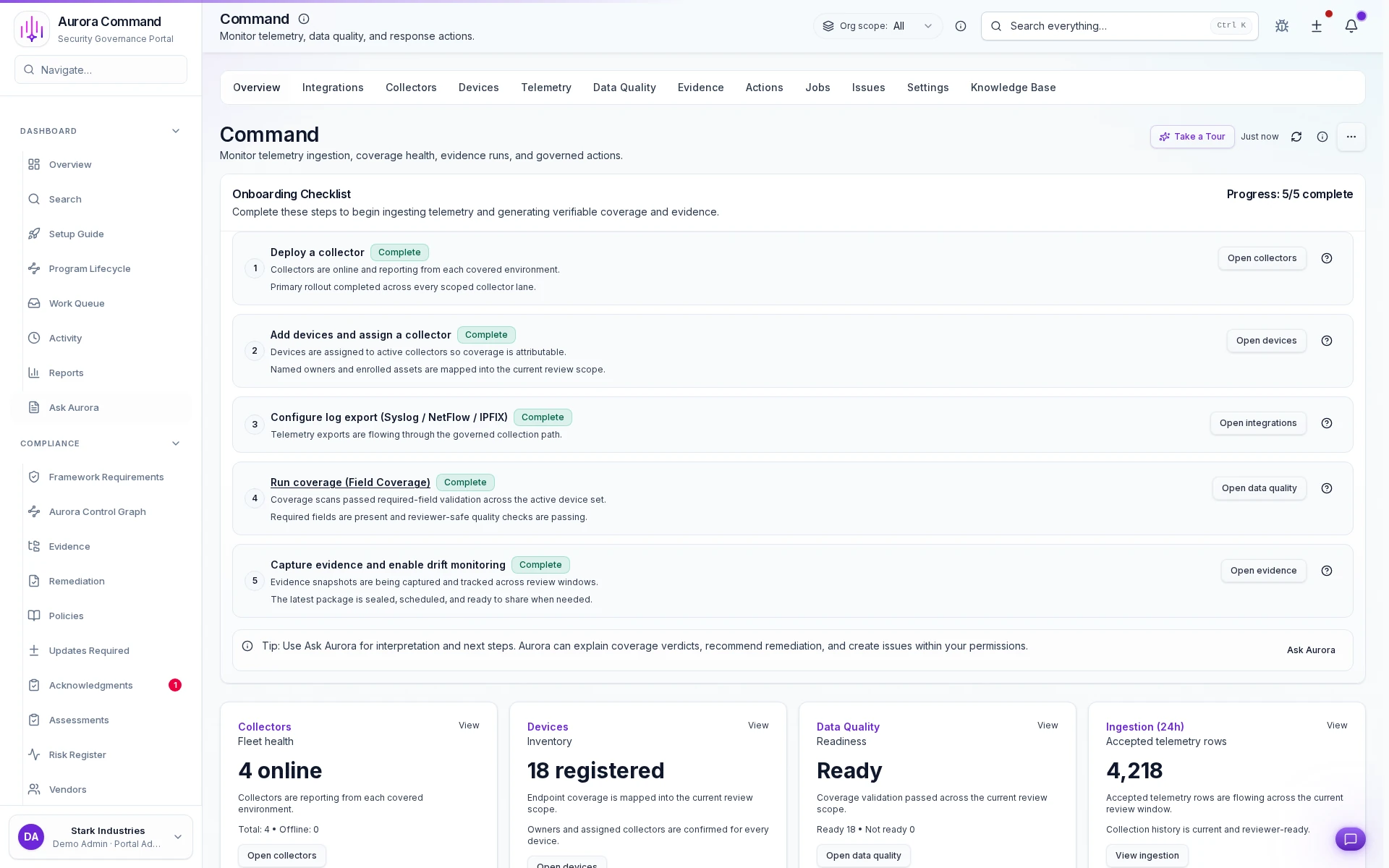
Rollout progress tracking
See which collectors are deployed, in progress, or blocked before claiming readiness.
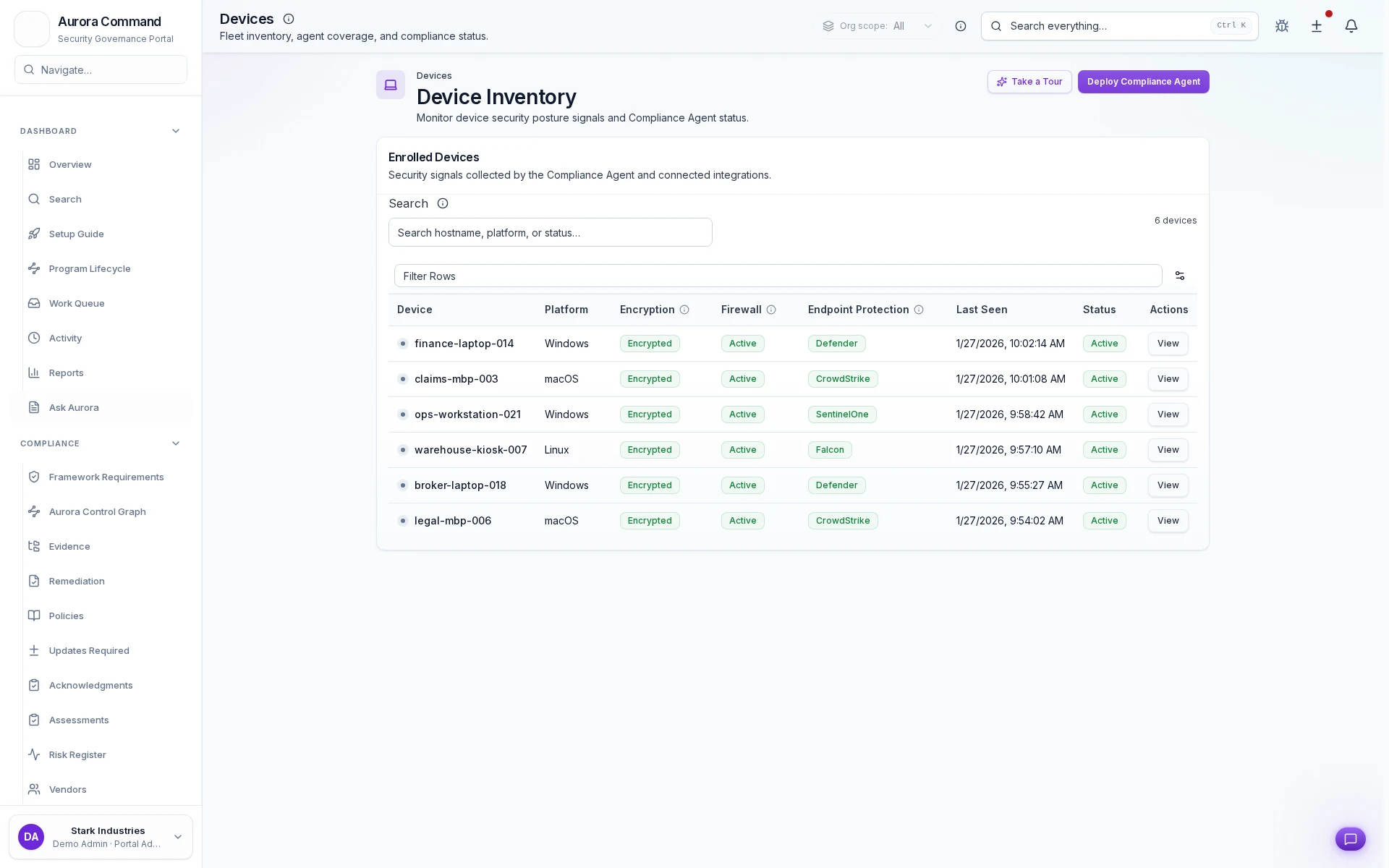
Device inventory with security posture
See encryption, firewall, endpoint protection, and agent status per device in the covered fleet.
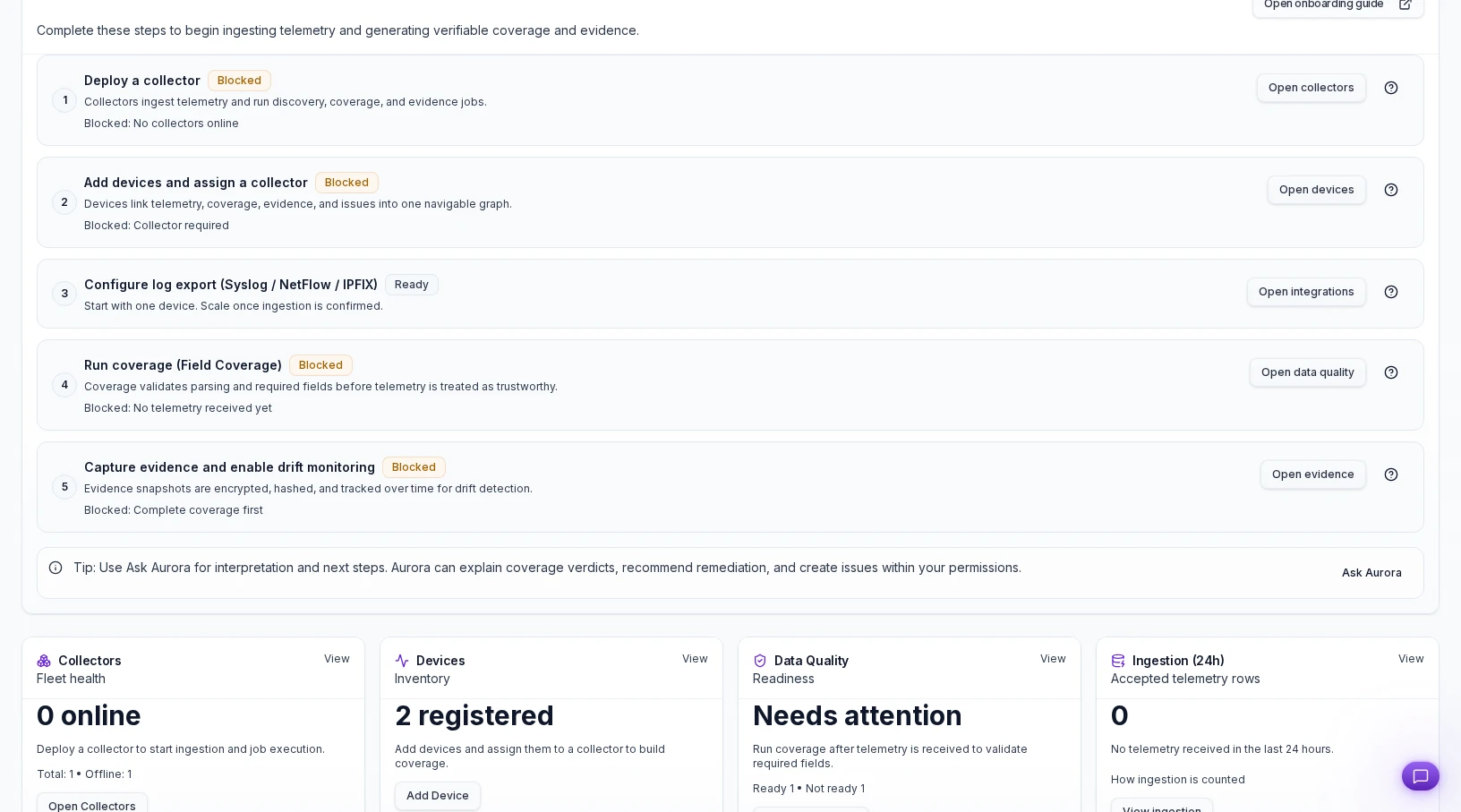
Coverage gates before export
Blocked gates hold the export until every required field and device passes verification.
From Ad-Hoc Exports to Governed Evidence Collection
Collection stays inside your perimeter
Coverage is verified, not just claimed
Exports pass gates before leaving
See In-Perimeter Evidence Collection in Action
Share one environment boundary or telemetry-heavy review. We will show rollout status, coverage gates, and governed exports before anything leaves your perimeter.
The Aurora Capabilities That Strengthen Command
Evidence & Cloud Collection
Cloud-native evidence collection that complements Command's in-perimeter collection for complete coverage across environments.
Continuous Compliance
The operating loop that keeps freshness, automation coverage, and findings current between review windows.
Risk & Findings
Findings from Command flow into the risk register for accountable follow-up with owners and remediation tracking.
Trust Center & Reviewer Access
Share Command snapshots through governed, time-bounded reviewer access with scoped visibility controls.
What Teams Often Open Next from Command
Regulated Hybrid Environments
Audit Readiness & Evidence Operations
Security Reviews
Common Questions Before Command Deployment
Does evidence data leave our network?
Why is Command priced separately from the rest of Aurora?
How do snapshots differ from regular evidence?
Can procurement reviewers see what changed between snapshots?
Is Command required for all environments?
How quickly can we deploy our first collector?
Is there a separate deployment process for Command?
Who is Command built for?
Aurora Command does not guarantee compliance outcomes. It helps you run and document the work.
Explore the Workflow on Your Own Time
Explore the workflow first. Book time when you want your own environment boundary walked through end-to-end.