Solutions
Share Evidence Without Sharing Your Workspace
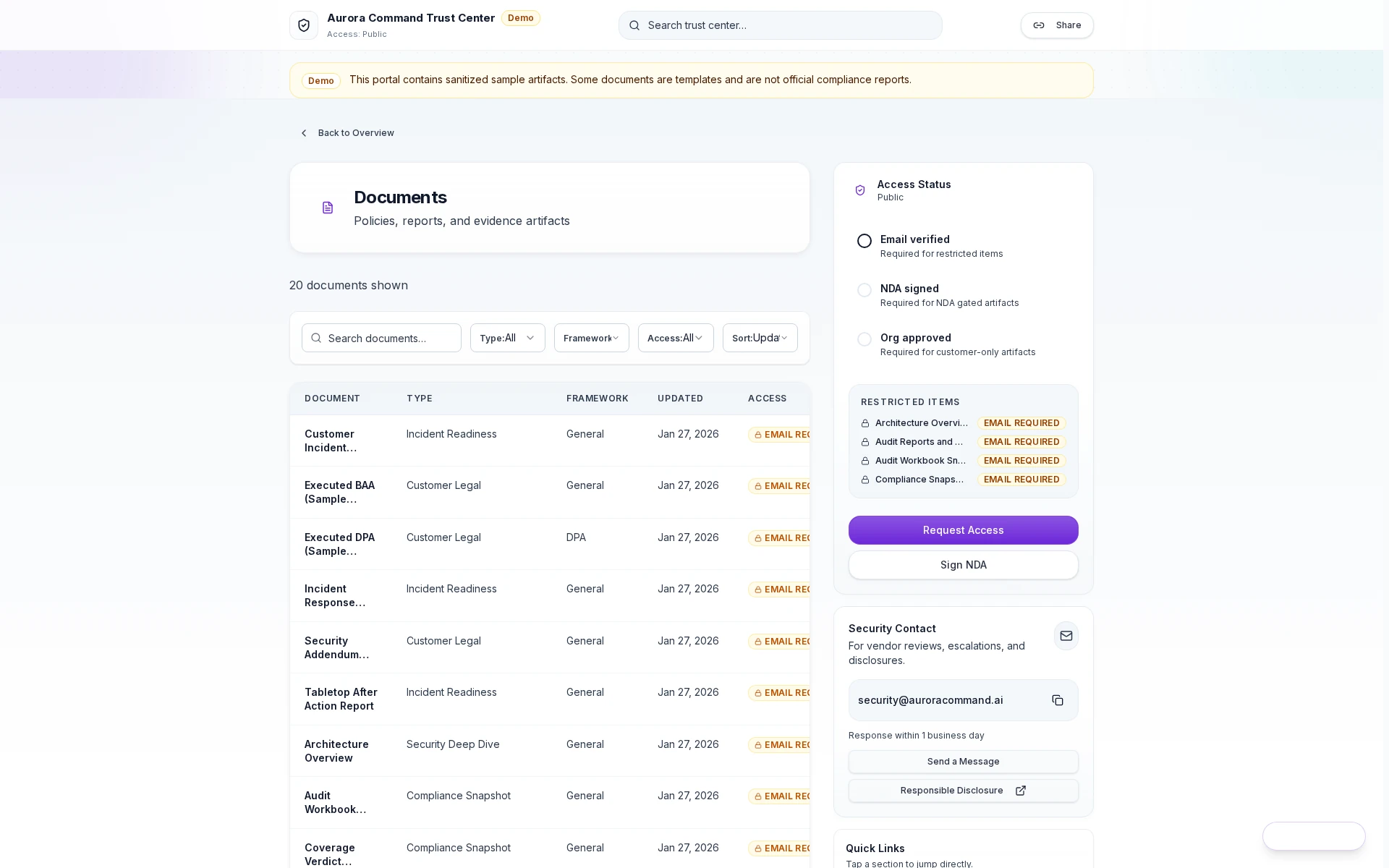
Controlled Sharing, Zero Overshare
Send reviewers a clean portal, not an inbox thread
Gate sensitive documents behind verification
Hand reviewers a security contact, not an alias
Surface restricted items without leaking them
Controlled Sharing, Zero Overshare
Scope materials per reviewer
Log every view and download
Revoke access when the review closes
Scoped Reviewer Package Access And Download Log Revocation History
Package the Right Evidence for the Right Reviewer
01
Define the reviewer type
Decide who the reviewer is, what they need, and how much access they should get.
02
Curate the package
Choose the evidence, exports, and supporting documents that fit this review.
03
Package answers with evidence
Include approved, cited responses when the reviewer is asking questions as well as requesting artifacts.
04
Set the controls
Use access tiers, expirations, or revocation when the package should remain bounded.
05
Track what happened
Keep the access, download, and revocation history visible for later follow-up.
Sharing Breaks When the Reviewer Gets the Wrong Level of Access
Reviewer scope is explicit
Decide exactly what each reviewer sees instead of sending the same bundle everywhere.
Shared evidence stays current
Build the package from the governed evidence base rather than from old local folders.
Access stays attributable
Keep the access and revocation trail visible for later follow-up.
Outputs That Make Reviewer Sharing Safer and Easier to Explain
The Aurora Capabilities Behind Reviewer-Safe Sharing
01Reviewer Operations & Controlled Access
The primary sharing layer for scoping, access controls, and reviewer activity.
02Assessments
The answer and citation layer that helps reviewer packages stay grounded.
03Evidence & Continuous Compliance
The governed evidence base that keeps the package current and attributable.
04Sample Reviewer Package
The fastest way to preview how reviewer-safe packaging should feel.
What Teams Often Open Next From Reviewer-Safe Sharing
Security ReviewsSee how the same governed evidence base supports questionnaires and buyer reviews.Audit Readiness & Evidence OperationsSee how the evidence layer feeds reviewer-safe packaging when audit windows open.Who It's ForUse Who It's For to see which reviewer-sharing page best fits your environment.
Questions Teams Ask Before Replacing Shared-Logins and Attachments
Do reviewers need access to our workspace?
Do reviewers need access to our workspace?
No. Aurora is designed so reviewers get scoped materials without access to the operating workspace behind them.
What if a reviewer still wants offline documents?
What if a reviewer still wants offline documents?
Aurora supports reviewer-safe exports and packaged artifacts when offline review is still part of the process.
Can reviewer access stay visible for procurement or audit follow-up?
Can reviewer access stay visible for procurement or audit follow-up?
Yes. Aurora keeps access, download, and revocation history visible so teams can explain what happened later.
Tell Us About Your Next Review
Share the questionnaire, framework scope, evidence request, or renewal packet you are working through and we'll show how Aurora handles it.
Share a framework, buyer request, questionnaire, or renewal packet. We'll show how Aurora handles it.