Product Module
Turn Tabletop Exercises into Defensible Readiness Records, Not Forgotten Slide Decks.
Facilitate simulations and sessions that generate structured after-action records with participant actions, identified gaps, and follow-up owners. Track every remediation to documented closure and export the evidence package auditors and insurers pull first.
Name the exercise requirement your insurer flagged. We will show how facilitated sessions, after-action records, and follow-up closure evidence export clean in one package.
Best fit
Response ReadinessExpand to ReadyOps when the workflow broadens.
Best for proving readiness with simulations, phishing, and reusable session records.
Sample output
Readiness summary export
Session OutcomesFollow-Up ClosureControl Mapping
The Difference Between Forgotten Drills And Defensible Records
Without Aurora
- Tabletop exercises happen once a year and results live in forgotten slide decks
- No follow-through on exercise findings, so the same gaps appear in every annual drill
- Exercise records are meeting notes that nobody can find when the auditor asks
- No way to prove exercise frequency or coverage across runbooks and teams
- Cross-team drills require weeks of coordination with no reusable scenario library
With Aurora
- Structured sessions with participant capture, scenario logging, and finding documentation
- Every finding converts to an owned action item with deadline, evidence, and closure tracking
- Searchable exercise library with scenario details, participant lists, and after-action reports
- Exercise cadence tracking per runbook with automatic staleness alerts when drills are overdue
- Reusable scenario templates with participant management and scheduling built in
Response Readiness
Best for proving readiness with simulations, phishing, and reusable session records.
- ReadyOps: Add workforce training and communications to tell one connected readiness story.
- Command: Add on-prem telemetry for regulated infrastructure.
Need help choosing?
Compare bundles and module pricing to find the right starting point, then confirm fit in a walkthrough if your workflow is regulated or time-bound.
The Numbers Behind Structured Exercise Programs
Finding Follow-Through
Every exercise gap converts to an owned task with deadline and evidence. No more findings lost in meeting notes.
Exercise Frequency
Teams with reusable scenarios and scheduling run drills quarterly instead of annually, building a stronger readiness record.
After-Action Report Time
Structured capture during exercises eliminates weeks of post-drill documentation work.
From Scenario Planning To Insurer Ready Evidence
01
Plan scenarios and assign facilitators
Select from scenario templates or build custom exercises, assign a facilitator and participant roster, define inject sequences, and lock the session scope so every drill starts with a clear brief.
02
Run facilitated sessions and capture actions
Record each participant decision, observation, and escalation in real time. Structured prompts ensure identified gaps and mitigating actions are logged, not lost in meeting notes.
03
Generate structured after-action records
Close the session and auto-produce an after-action report with a scenario timeline, participant contributions, gap inventory, and recommended follow-ups ready for leadership review.
04
Track follow-ups to documented closure
Convert every identified gap into an owned remediation task with a deadline, responsible party, and required closure evidence. Nothing stays open without a name and a due date.
05
Export defensible readiness records
Package exercise history, after-action reports, and follow-up closure evidence into auditor- and insurer-ready exports or publish them through controlled Trust Center access.
Key Capabilities
Feature 1 of 13: Scenario-Based Exercise Planning
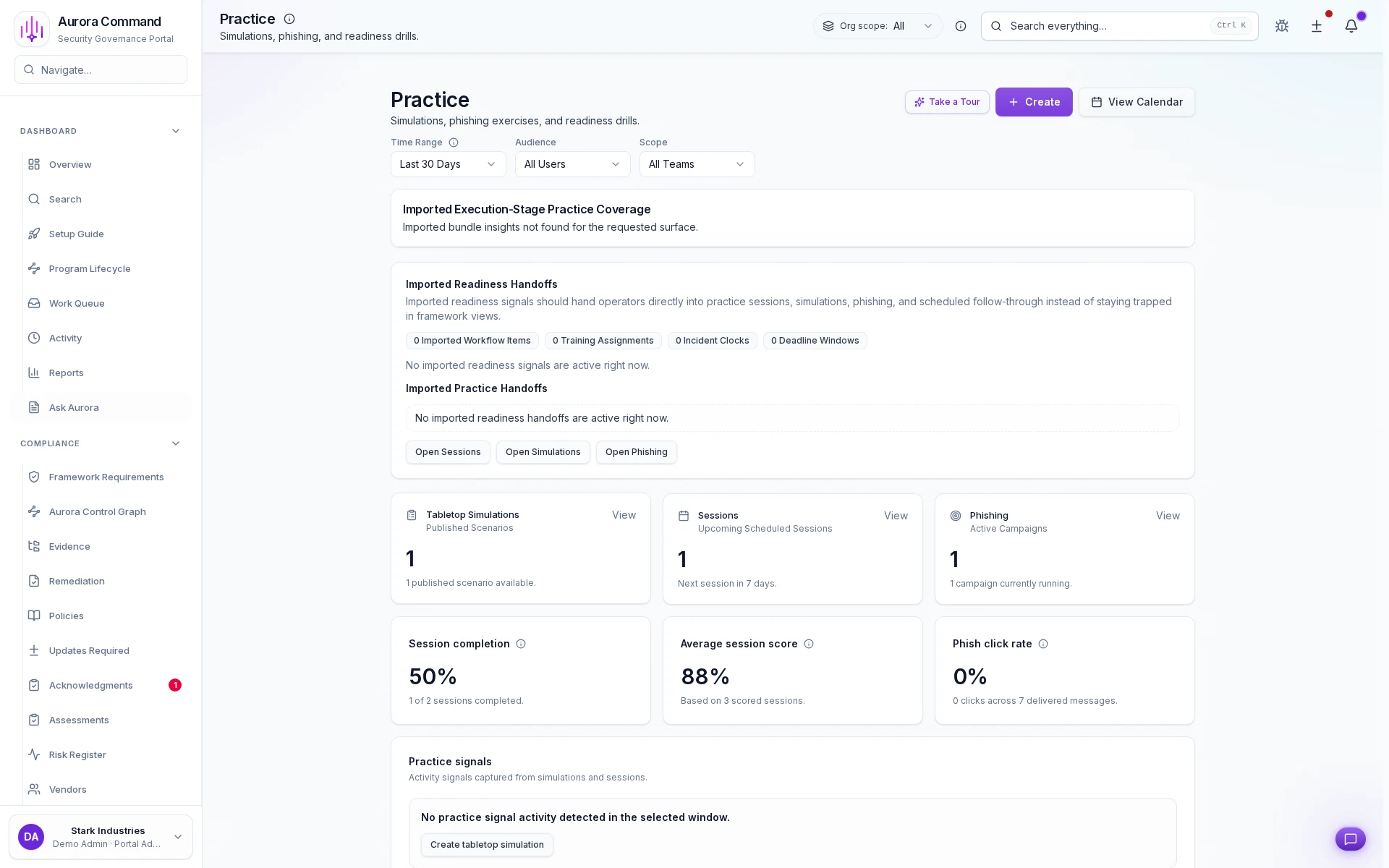
1/13
Scenario-Based Exercise Planning
Build tabletop, walkthrough, or full-simulation scenarios with cinematic inject timelines, participant rosters, and facilitator guides so every drill begins from a repeatable playbook instead of improvised agendas. Fifteen production-ready scenarios ship in the canonical library across ransomware, insider threat, vendor compromise, regulated-industry breach, and social-engineering domains.
Artifacts reviewers recognize, plus sample previews of structure.
Scroll for artifact previews
Bring Session Context From The Tools Teams Already Use
Extend This Workflow
- Training & AcknowledgmentsCourse completions and attestation logs tied to the controls each exercise validates.
- Phishing SimulationsCampaign click-to-report ratios feeding readiness signals into exercise cadence tracking.
- Incident Readiness & ResponseVersioned runbooks and MTTA/MTTR timelines for incident-specific exercises.
- Emergency CommunicationsOut-of-band notification chains and drill logging with delivery acknowledgements.
- GovernancePolicy attestation and control coverage mapped to exercise readiness criteria.
- RiskRisk register, remediation ownership, and closure evidence across programs.
Questions Teams Ask About Simulations & Sessions
Can we run custom scenarios or do we have to use built-in templates?
Can we run custom scenarios or do we have to use built-in templates?
Both. Build entirely custom exercises or start from built-in scenario templates and adapt them. The structured after-action format captures outcomes consistently regardless of exercise type, whether tabletop discussion, guided walkthrough, or full-scale simulation with live injects.
How does the facilitation workflow capture participant actions during a live session?
How does the facilitation workflow capture participant actions during a live session?
The facilitator follows a guided prompt sequence that logs each participant decision, observation, and escalation in real time. Structured fields ensure gaps and mitigating actions are recorded as they surface rather than reconstructed from memory after the session ends.
How do exercise records satisfy audit and insurance evidence requirements?
How do exercise records satisfy audit and insurance evidence requirements?
Each after-action record links to the specific controls the exercise validates. When auditors or insurers sample your preparedness evidence, they see scenario scope, participant actions, identified gaps, follow-up owners, and closure timestamps already mapped to their requirements.
Can follow-up items be assigned across teams with deadline tracking?
Can follow-up items be assigned across teams with deadline tracking?
Yes. Every identified gap becomes an owned remediation task with a named responsible party, hard deadline, and required closure evidence. Cross-team items stay visible on shared dashboards with escalation alerts so nothing ages out quietly between review cycles.
How do we demonstrate readiness improvement to insurers over multiple quarters?
How do we demonstrate readiness improvement to insurers over multiple quarters?
Readiness history aggregates exercise outcomes, training completions, simulation results, and follow-up closure rates into a continuous timeline. Reviewers see how your preparedness posture evolves across quarters and programs, not just a snapshot from the last drill you happened to run.
Every Drill Without A Record Is A Missed Audit Opportunity
Share one exercise requirement. We will show how facilitated sessions produce structured after-action evidence with participant actions, follow-up owners, deadlines, and exportable readiness history.
Share one tabletop scenario or session outline. We will show how Aurora captures participation, findings, and follow-through.