Skip to content
Behavioral measurement, not just simulations

Turn Phishing Tests into Measurable Resilience Proof That Satisfies Insurers.

Launch targeted phishing campaigns, measure click-to-report ratios by team and role, auto-route high-risk cohorts to follow-up training, and export campaign-over-campaign trend evidence that shows insurers your people are actually getting better.

Share your latest campaign report. We will show how cohort outcomes, training follow-ups, and trend trajectories connect into one ready-for-review evidence workflow.
Best fit
Workforce ReadinessExpand to Readiness Suite when the workflow broadens.

Best for phishing simulations and readiness records you can reuse.
Sample output
Campaign resilience report
Cohort outcomes, click-to-report ratios, training follow-up status, and trend movement, one export for any reviewer.
Cohort-by-Cohort ResultsTrend Trajectory by CycleTraining Follow-Up Linkage
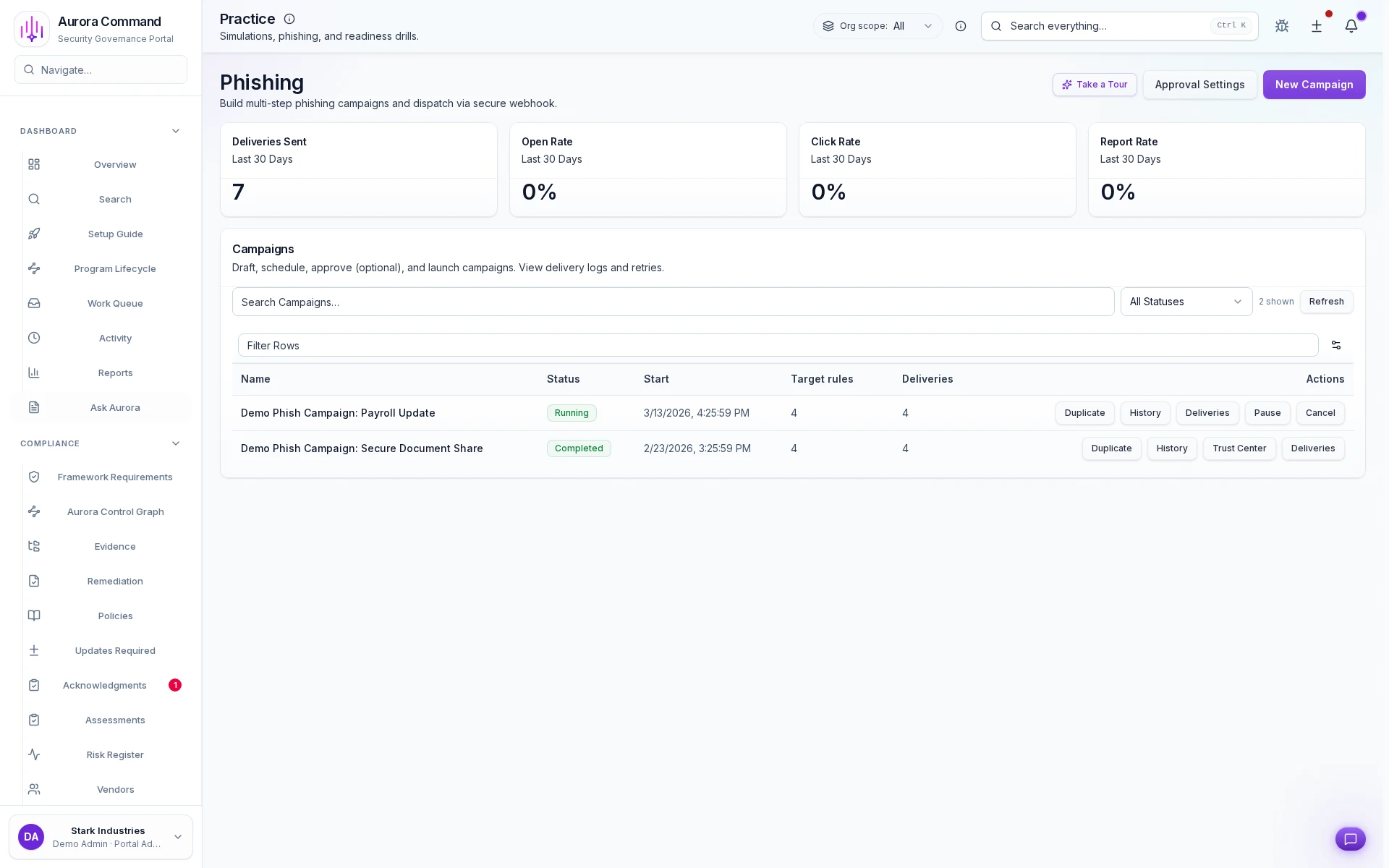
Aurora Command phishing campaigns with metrics and target groups

Two live campaigns, real targets, real timelines

Payroll Update running since 3/19 with 4 targets, Secure Document Share completed on 3/1 with 4 targets. Each campaign tracks status, dates, and target count side by side.

1 of 1

Measurable Impact

The Numbers Behind Measurable Phishing Resilience

Teams that run progressive campaigns, route failures to training, and track trends see these outcomes across insurer reviews.

0%
Click Rate Reduction
Progressive simulation campaigns drive measurable improvement in phishing resistance across cohorts over time.
0%
Remediation Training Coverage
Every employee who fails a simulation is automatically routed to targeted training with completion tracking.
0x
Trend Evidence Depth
Campaign-over-campaign results show insurer-ready improvement trajectories, not just point-in-time snapshots.
Recommended fit
Workforce Readiness
Best for phishing simulations and readiness records you can reuse.
Where teams expand next
  • Readiness Suite: Add incidents, exercises, and communications when the story needs to span more than workforce signals.
  • Command: Add on-prem telemetry for regulated infrastructure.
Need help choosing?
Compare bundles and module pricing to find the right starting point, then confirm fit in a walkthrough if your workflow is regulated or time-bound.

Before & After

The Difference Between Running Tests And Proving Resilience

See what changes when phishing campaigns drive training, track trends, and produce evidence instead of isolated vendor reports.

Without Aurora
  • Phishing tests run once a year as a checkbox exercise with no follow-up training
  • Results live in a vendor dashboard that nobody connects to training or readiness programs
  • No way to show improvement over time because each campaign is an isolated data point
  • Employees who fail simulations get a generic email with no targeted training or follow-up
  • Insurer asks for phishing resilience evidence and the team exports a single vendor report
With Aurora
  • Progressive simulation campaigns with automatic remediation routing and completion tracking
  • Phishing outcomes feed directly into readiness scoring, training assignments, and trend reporting
  • Campaign-over-campaign trend analysis showing measurable resilience improvement per cohort
  • Automatic routing to targeted training modules with completion tracking and attestation
  • Multi-campaign trend data with remediation evidence and training completion rates in one export

How It Works

From Campaign Launch To Resilience Proof

Every campaign produces cohort-level outcomes, auto-triggered training assignments, and exportable trend evidence that closes the loop between simulation and measurable improvement.

01
Launch targeted campaigns
Build campaigns with SCIM-synced cohorts, schedule send windows, set difficulty tiers, and route through approval before the first email lands.
02
Monitor real-time cohort outcomes
Watch delivery, open, click, and report rates update live across target groups so you can spot high-risk pockets before the campaign closes.
03
Route high-risk cohorts to training
Automatically assign follow-up awareness modules to the teams and roles whose click rates crossed your threshold, no manual triage needed.
04
Measure trend movement across cycles
Overlay baseline click-to-report ratios against every subsequent campaign to surface the trajectory insurers and auditors actually ask for.
05
Export evidence for insurers and auditors
Package campaign history, cohort outcomes, training completion links, and trend snapshots into ready-for-review exports timed to your renewal calendar.

Verified Before Review

Key Capabilities

Click-to-report ratios, cohort breakdowns, training linkage, and trend trajectories: the phishing evidence that turns simulation activity into measurable resilience and satisfies reviewers.

Feature 1 of 5: Campaign Operations Dashboard
Phishing campaign capabilities
1/5

Campaign Operations Dashboard

See every active and closed campaign in one view, including delivery counts, open rates, click-to-report ratios, and cohort status, so you know exactly where each simulation stands without switching tools.

The Phishing Evidence Insurers Evaluate And Auditors Verify
Artifacts reviewers recognize, plus sample previews of structure.
Scroll for artifact previews

Common Questions

Questions Teams Ask About Phishing Campaign Operations

How campaign targeting, behavioral measurement, training follow-up, and trend evidence connect into the resilience story insurers and auditors expect.

Does Aurora run the phishing simulations itself?
Simulation execution depends on your plan and configuration. Aurora ingests results from campaigns, wherever they originate, and ties them to cohort targeting, training follow-up, and trend analysis so every simulation becomes part of your resilience record.
Can we customize campaign difficulty and targeting?
Yes. Campaigns support difficulty tiers, SCIM-synced cohort targeting by department and role, scheduled send windows, and approval gates. You control who gets tested, at what level, and when. Aurora tracks every parameter for audit history.
How often should we run phishing simulations?
Most insurers expect at least quarterly cadence, but monthly campaigns produce smoother trend data. Aurora tracks frequency automatically, flags gaps between campaigns, and timestamps every cycle so reviewers can verify your cadence without asking.
How do we prove resilience improvement to insurers at renewal?
The resilience trend summary overlays baseline click-to-report ratios against every subsequent campaign cycle at the org, department, and team level. Export it as a PDF or CSV timed to your renewal window. Insurers see the trajectory, not just a single snapshot.
Can we link training completion to simulation improvement?
Every click that crosses your threshold triggers a training assignment. Aurora tracks the assignment, completion date, and whether that person's behavior changed in the next campaign cycle, giving you a direct line from remediation to measurable outcome.
Live walkthrough
Running Phishing Tests Is Activity. Showing Trend Improvement Is Evidence.
Share your campaign data. We will show how cohort targeting, click-to-report trajectories, and training follow-up records become the resilience proof buyers and insurers can verify.
Share your latest campaign report. We will show how cohort outcomes, training follow-ups, and trend trajectories export clean for the next reviewer.