Skip to content
For audits, reviews, and renewals

Stop Rebuilding Proof for Every Audit, Security Review, and Renewal.

Aurora keeps policies, evidence, approved answers, and reviewer sharing in one place so every new request starts from current proof instead of a scramble.

  • Keep approved answers, evidence, and sign-off history in one maintained record.
  • Give external reviewers secure access without exposing the workspace.
  • Keep readiness records tied to the same proof record you use for reviews and renewals.

We'll show the exact export you can send with what you already have.

Live Workspace Preview
See the Maintained Proof Record Teams Open First

Policies, evidence, approved answers, reviewer sharing, and readiness records stay tied to one maintained record.

Unlimited ReviewersNo Approved-Domain FeeNo Viewer-Seat FeeNo Per-Question FeeSSO and SCIM IncludedAudit Exports and SIEM Sinks IncludedAffordable Framework ExpansionTransparent Add-Ons24-Month Price Protection

Why Review Cycles Break Down

You Already Do the Work. Chaos Starts When Someone Asks for It.

Most teams are not missing the work. They are missing the structure that makes it current, reusable, and safe to share when a reviewer asks for it.

The Proof Is There. It Is Just Scattered.

Policies, exports, approvals, and screenshots live across drives, inboxes, tickets, and shared docs. When a reviewer asks, nobody is sure what is current.

Each New Review Triggers a Rebuild.

Auditors, security reviewers, procurement teams, and insurers ask for slightly different versions of the same work. Without one shared record, teams rewrite answers they already proved.

Gaps Stay Hidden Until the Deadline Hurts.

When freshness, ownership, and review schedules are not visible, the missing piece only shows up when an external review turns it into a fire drill.

Replace spreadsheet sprawl and ad hoc review folders with one organized proof record. Already have a GRC platform? Aurora fills the gaps around evidence freshness, ownership, and reviewer sharing that legacy tools miss.

What Aurora Covers

Four Parts of the Workflow, Connected in One System

Aurora keeps your proof record, reviewer sharing, readiness work, and deeper technical validation connected so each new request starts from current information instead of a scramble.

Approved Answers and Evidence

Keep controls, evidence, reusable answers, and approvals in one maintained system so each audit, security review, and renewal starts with answers you already trust.

Controlled Reviewer Sharing

Give external reviewers a clean, controlled experience with access controls, requests, messages, logs, and export options.

Readiness Records

Keep training, drills, incidents, and response records tied to the same evidence so readiness work supports the next review instead of living in a separate tool.

Technical Proof for Regulated and Hybrid Environments

Add deeper technical validation for environments where screenshots, file uploads, and cloud-only evidence are not enough.

How It Works

Map Once. Keep Proof Current. Share Safely.
Aurora gives your team one workflow for controls, evidence, readiness records, and reviewer sharing - so each new review starts from the same up-to-date base.

01
Scope What Applies
Choose the frameworks, teams, and review windows that apply - so the work starts focused, not sprawling.
02
Map Once
Link overlapping requirements to one control library so the same answer serves many frameworks and repeat questionnaires.
03
Keep Proof Current
Track freshness, ownership, and collection status so missing or stale proof shows up before review season becomes a scramble.
04
Keep Readiness Connected
Keep approvals, training records, exercises, and incident follow-through tied to the same proof record.
05
Share Safely
Open a controlled reviewer view or export exactly what the request requires - without exposing your internal workspace.
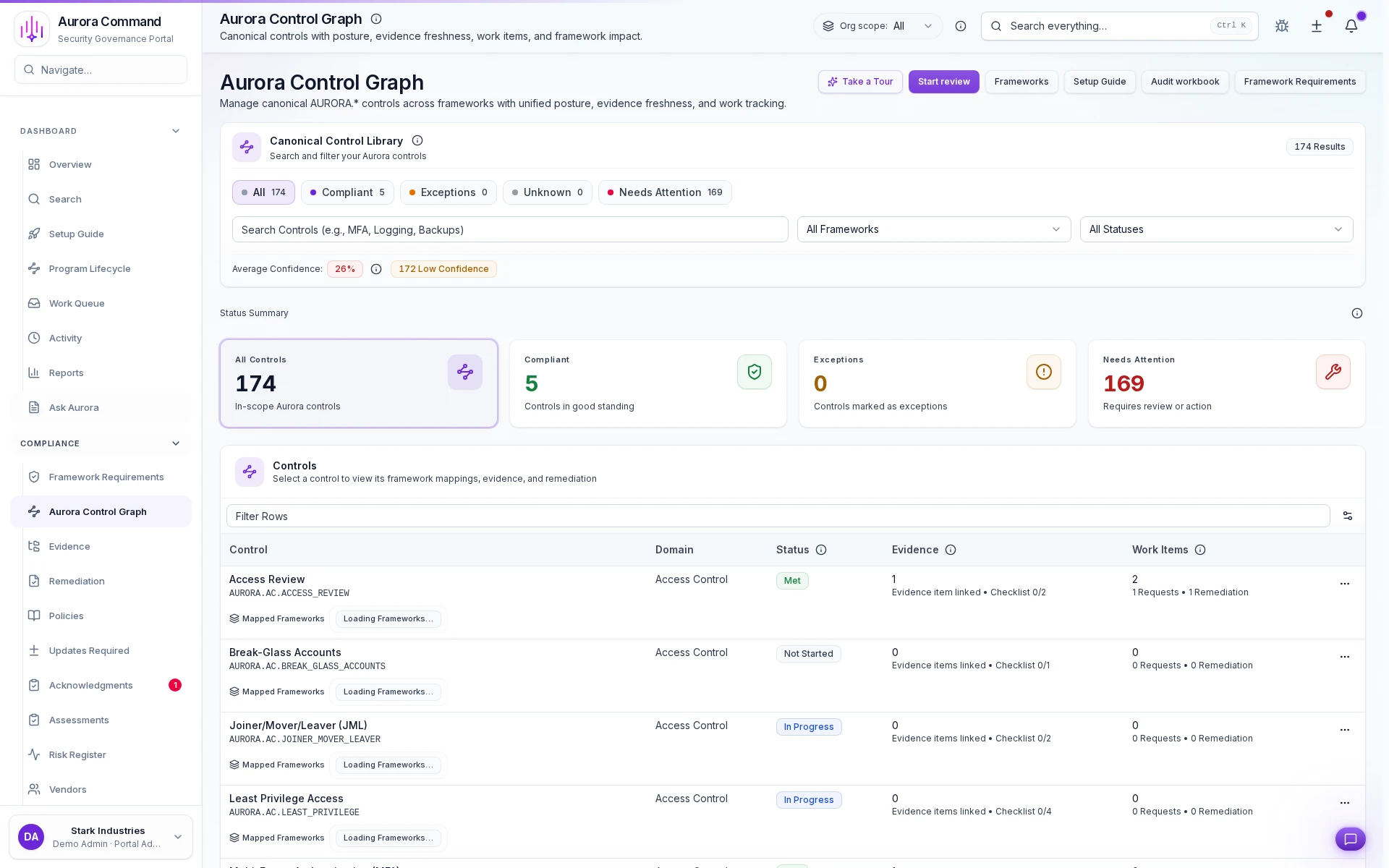
Aurora controls workspace showing canonical controls, framework mapping, and linked evidence.
Controls Workspace

One Control Library. Many Framework Answers.

Map a control once, attach the evidence, and reuse the same answer across overlapping frameworks and questionnaires.

Reviewers See the Proof in Context.

Control requirements, mapped frameworks, linked evidence, and gap status stay in one view instead of getting rebuilt from tabs, folders, and exports.

Proof You Can Send

What External Reviewers Actually Receive

Aurora gives outside reviewers a controlled portal, a clean export when offline files are required, and a full trail of what was shared.

Reviewer Ready Export

Send structured answers, citations, and supporting proof instead of a raw file dump.

Controlled Reviewer Portal

Give external reviewers a controlled portal with only the proof they need.

Security and Sharing Controls

See how Aurora protects your evidence, access permissions, and reviewer sharing.

Read-Only Where Possible

Connected systems use scoped permissions - proof collection never requires broad write access.

Every Action Leaves a Trail

Views, downloads, approvals, and exports stay logged by default.

Sharing Stays Controlled

Set access tiers, link expirations, and agreement gates so every share is deliberate.

One System for the Whole Program

Proof, Readiness Records, and Technical Evidence All in One System

Governance, evidence, training, simulations, incidents, and technical validation all feed the same record - so every answer starts from one source of truth.

Assessments
Answer security questionnaires faster with cited, pre-approved language that stays consistent across reviews.
Evidence
Track every artifact by source, owner, and schedule so nothing drifts out of date between reviews.
Governance
Move policies from draft through approval with versioned records and clear ownership at every stage.
Risk
Register risks, track exceptions, assign remediation owners, and run vendor due diligence -- all from a single workspace.
Trust Center
Give reviewers controlled access to exactly what they need, with full audit trails and expiring links.
Enterprise Controls
Centralize SSO, SCIM, API keys, scoped access, and reviewer-safe governance controls for larger operating footprints.
Support Requests
Structured request intake with owner assignment, threaded replies, status transitions, and private team notes.
Messaging Operations
Messaging workflows with acknowledgment timelines, escalation history, and clean communication records.
Readiness Analytics
Score readiness across exercises and campaigns so your team can prove measurable improvement.
Readiness Suite Bundle
Bundle Workforce Readiness and Response Readiness when outside reviewers need one clean story for people, exercises, incidents, and communications.
Aurora Copilot
Draft answers grounded in your evidence - with human review and approval before anything ships.
Simulations & Sessions
Run facilitated exercises and capture session outputs, follow-up ownership, and reusable readiness records.
Command
Collect infrastructure evidence from scoped read-only collectors (early access).
Implementation & Success
Keep onboarding, launch, deployment help, and premium support explicitly priced so service work stays visible and predictable.

Connected Readiness

Keep Training and Incident Response Tied to the Proof You Already Share

Aurora keeps workforce readiness and response readiness connected to the same evidence, approvals, and review history your team already uses for audits, renewals, and external reviews.

Workforce Readiness

Keep training, acknowledgments, phishing, and practice activity in one place so you can show who completed what and where follow-up is still needed.

See Workforce Readiness

Response Readiness

Keep exercises, incidents, playbooks, communications, and follow-up work in one record so response proof is ready when auditors, insurers, or customers ask.

See Response Readiness
Command for Harder Environments

Add Technical Proof When Screenshots and Uploads Are Not Enough.

Aurora Command gives regulated and hybrid teams scoped collectors, encrypted snapshots, and environment-level evidence they can use in audits, security reviews, and tougher technical evaluations.

No Attachment Chaos

Share Proof without Exposing Your Internal Workspace

Give each reviewer a professional portal, keep the live workspace private, and log every view, download, and export.

Controlled Reviewer Portal

Give external reviewers a clean proof portal with only the documents that fit their request.

Offline Export When Required

Send a clean reviewer package when a request still needs files.
Preview reviewer export
Preview the format reviewers receive.

Every Access Event Logged

See who viewed, downloaded, approved, or exported proof when follow-up questions arrive.
See Sharing Controls
See how Aurora protects your evidence, access, and reviewer sharing.
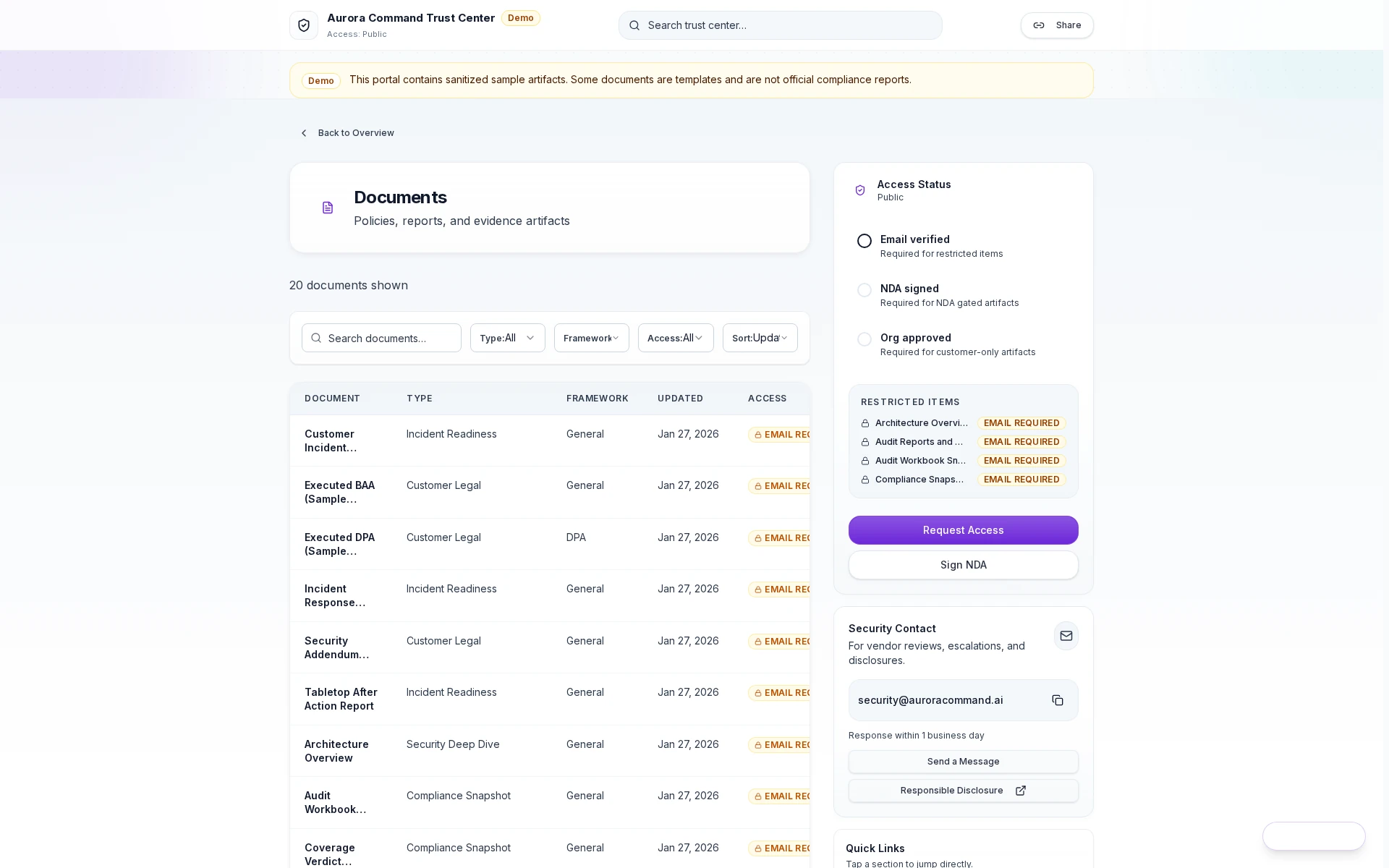
Aurora trust center portal showing scoped documents, access rules, and the request-access flow.
Reviewer Portal Access View

Reviewers get a professional front door - not an attachment thread or a peek inside your workspace.

Every view, download, and export is logged in one activity timeline you can reference during follow-up.

When follow-up questions come back, the sharing rules, access history, and exact packet are already in context.

Give reviewers a clean, credible handoff without losing control of what was shared.

However Evidence Arrives

No Matter How Proof Arrives, It Becomes Review-Ready

Whether it arrives via connector, upload, or manual attestation - every piece of evidence lands in one record with source, owner, freshness, and status visible.

Via integrations

Connected Systems

Pull proof on a schedule so current status stays visible without manual chasing.

  • Cloud configuration snapshots
  • Access review exports
  • Vulnerability scan results
Upload & track

Uploaded Proof

Upload exports and keep history, freshness, and ownership in one record.

  • Penetration test reports
  • Insurance certificates
  • Third-party audit letters
Owner & cadence

Attestations and Approvals

Track the work no connector can do for you, with owners and review cadence.

  • Policy approvals
  • Training completion
  • Risk acceptance decisions
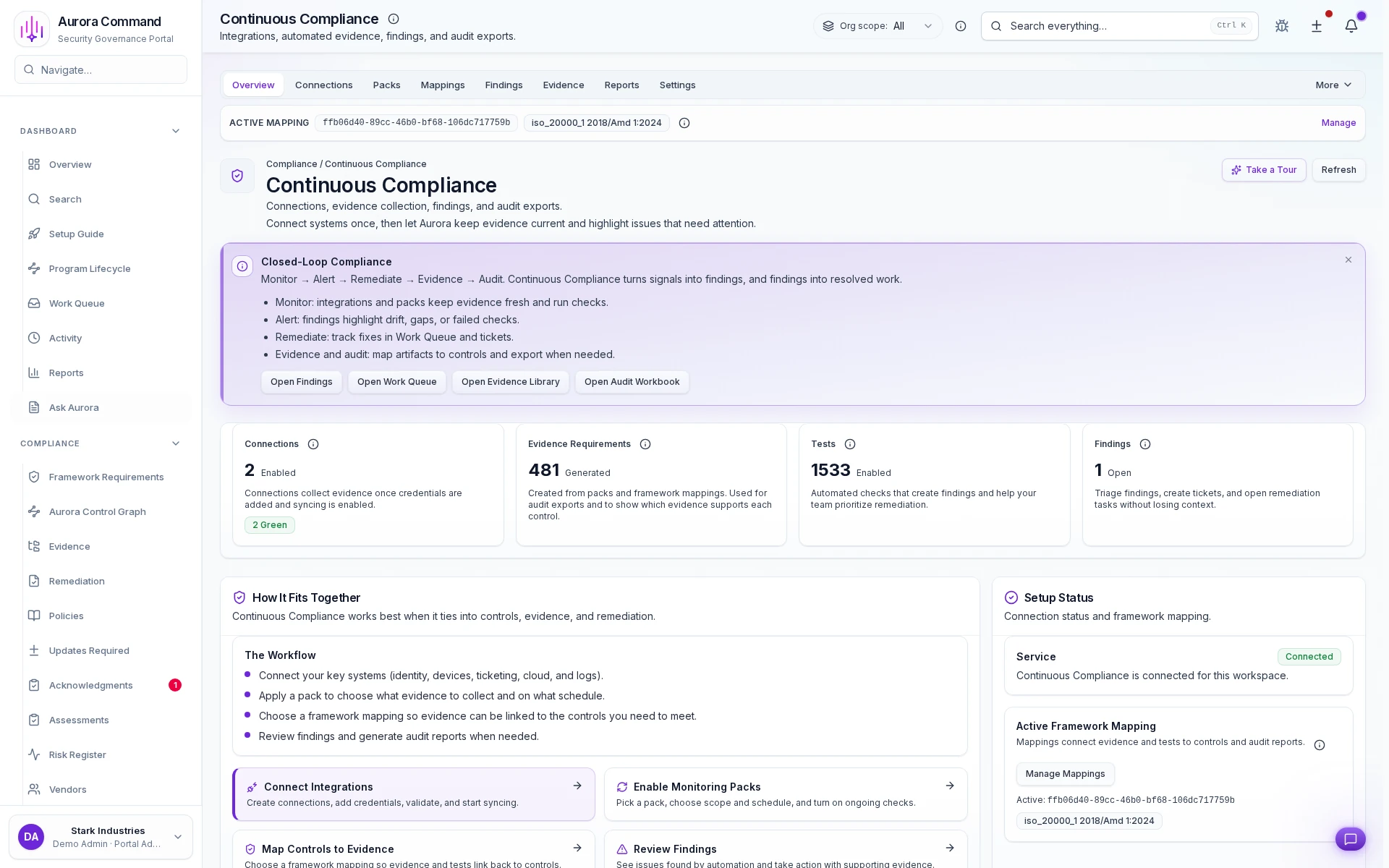
Aurora continuous compliance workspace showing connection status, mapped evidence requirements, findings, and audit export paths.
Continuous Compliance Overview
Connected Sources Report Status Automatically
Every Requirement Mapped to Evidence with a Clear Owner
Findings Assigned, Routed, and Tracked to Closure

One Workspace, Multiple Review Paths

Start with the Review You Need to Close Next

Open the workflow that matches your next deadline - audit, external review, renewal, or readiness milestone - and see the path Aurora runs.

Security Reviews

Answer questionnaires with cited, approved responses.

Audit Readiness & Evidence Management

Keep evidence current so audits start from proof, not scramble.

Training & Policy Adoption

Turn policy and training work into records reviewers can sample.

Incident Readiness & Response

Show exercises, response records, and follow-through in one place.
Built for regulated operators

Aurora Is Built for Real Operators, Not Just Generic SaaS Checklists.

Insurance teams using Applied Epic and Vertafore AMS360
Auto, mortgage, and title operators closing recurring diligence
Banking, wealth, and fintech teams that need governed proof beyond a trust portal
Healthcare and PHI-bound operators with stricter reviewer scrutiny
Contact center operators proving training, oversight, and incident handling
Regulated hybrid environments that eventually need Command

Lead With Proof

Show the Workflow Before You Send the Deck

Start with real product proof, then go deeper with sample reviewer outputs or pricing as the evaluation moves forward.

Before You Commit

What Teams Want to Know Before They Start

Will this create more work for our team?
Aurora cuts review-cycle work by keeping evidence organized, fresh, and reusable. Map controls once, track freshness with owners and reminders, and reuse outputs across reviews. Results vary by scope and maturity.
Can we control what reviewers see?
Yes. Trust Center lets you create access tiers, set expiring links, require agreements before access, and track every view and download. You share only what is relevant to each reviewer.
What is automated vs. manual?
Aurora labels every evidence source. Automated checks run where integrations support them. Export-based evidence gets uploaded and tracked for freshness. Manual evidence like attestations and approvals is tracked with owners and cadence. You always know the source type.
How do we keep evidence from going stale?
Every evidence item has an owner, a refresh schedule, and automated reminders. Aurora flags what is expiring before reviewers notice - so you refresh on schedule instead of scrambling before audits.
Does Aurora replace our GRC (governance, risk, and compliance) tool?
Aurora Command keeps evidence fresh and gets proof in front of reviewers. If you already have a GRC tool, Aurora fills the gap around evidence freshness and reviewer sharing. If you are outgrowing spreadsheets and one-off review folders, Aurora replaces them.

Aurora Command helps you run and document the work. Compliance outcomes still depend on your program and your reviewers.

Live walkthrough
See How Your Next Review Gets Easier
See how Aurora keeps controls, evidence, and reviewer packages current between review cycles.
15-minute walkthrough. No obligation. We'll show Aurora applied to your workflow and show the exact outputs. (No compliance guarantees.)