Feature
Messaging Operations: Coordinate high-stakes communication with measurable acknowledgments.
Messaging Operations gives security and compliance teams a dedicated workspace for critical communications, acknowledgment tracking, and escalation continuity. Keep communication evidence organized and easy to review instead of scattered across ad hoc channels.
Coordinate high-stakes communication with measurable acknowledgments.
- Completion records hold up:Assignments, attestations, and timestamps stay easy to verify later.
- Exercises produce a record:Scenarios, injects, and after-action notes stay tied to the session.
- Progress is measurable:Track cohorts, overdue work, and readiness trends without manual rollups.
- Follow-ups stay owned:Gaps turn into named work with dates, history, and proof of closure.
Sample output
Communication timeline export
Answers with linked evidence
Prove Every Message Was Delivered And Acknowledged
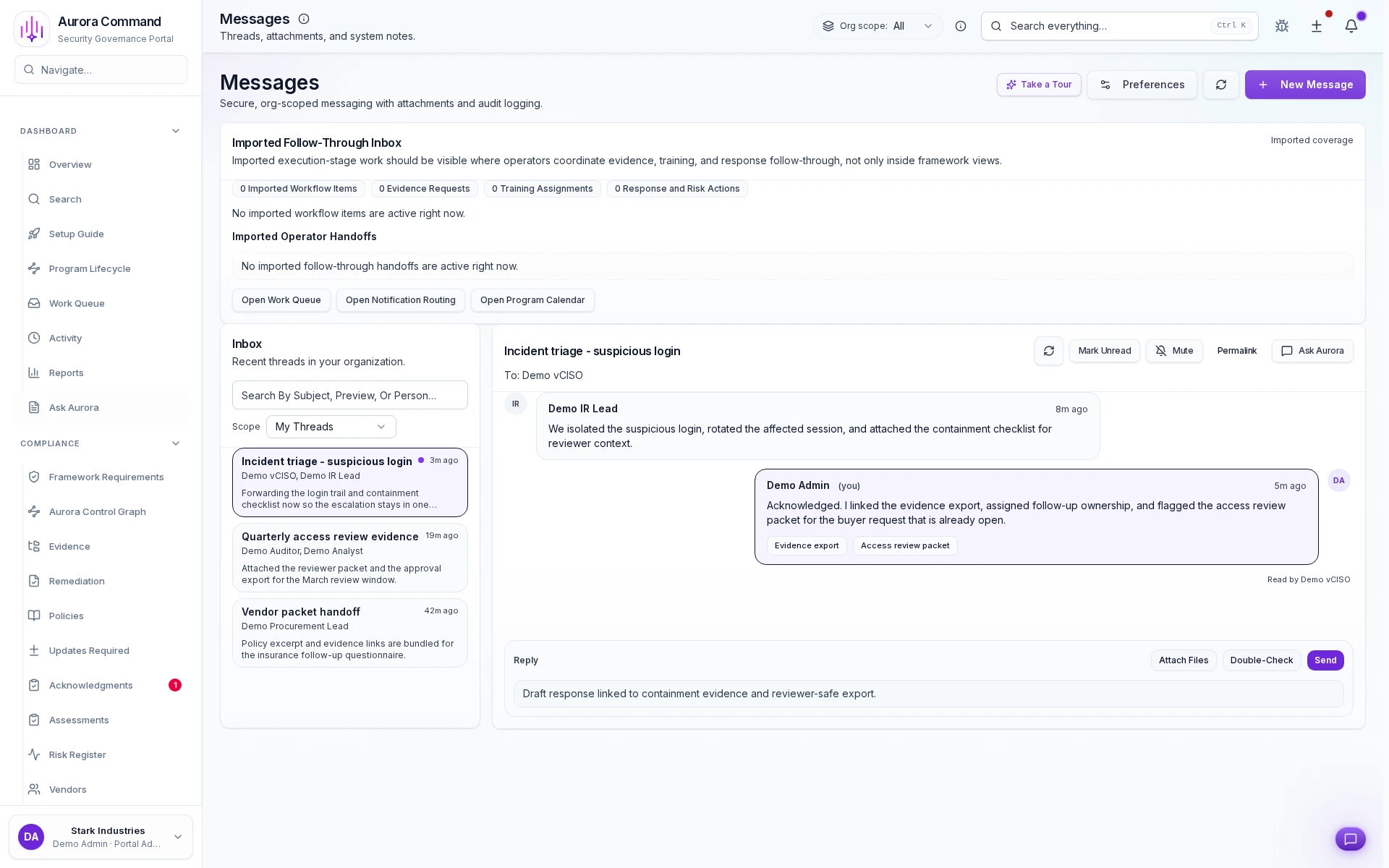
Send messages with provable delivery
Tie inbox threads to the work they coordinate
Run incident, vendor, and review threads in one inbox
How Teams Run Messaging Operations With Audit History
01
Build the audience and message
Start with the right recipients and the message path that fits the scenario.
02
Send with channel-aware delivery
Track distribution across the channels your team actually uses.
03
Monitor acknowledgments and responses
See who received the message and who still needs follow-up.
04
Escalate misses and exceptions
Route follow-up work before communication failures become operational risk.
05
Preserve the communication record
Keep the timeline and response trail ready for insurers, buyers, or internal review.
What This Adds To Messaging Operations
Feature 1 of 5: Designed for
1/5
Designed for
Incidents • Security reviews • Insurance reviews
Artifacts reviewers recognize, plus sample previews of structure.
Scroll for artifact previews
Connect The Channels Behind Each Message Path
Questions Teams Ask
What record is left after a training cycle or exercise?
What record is left after a training cycle or exercise?
Teams usually share Communication timeline export; Acknowledgment report; Escalation chain record. Aurora keeps completion, participation, and follow-up work attached to the same operating record.
Can we prove completion without screenshot chasing?
Can we prove completion without screenshot chasing?
Yes. Completion, attestations, and timelines stay structured in Aurora instead of being rebuilt from inboxes and folders.
How do follow-ups stay owned after the session?
How do follow-ups stay owned after the session?
Post-session gaps become tracked work with named owners, dates, and a visible proof trail back to the exercise or training run.
Where does this help most?
Where does this help most?
It fits best when the team is handling Incidents, Security reviews, Insurance reviews and needs the work to stay reusable instead of being rebuilt each cycle.
Share The Training Or Exercise Record A Reviewer Will Ask For.
We’ll show how Aurora captures completion, participation, follow-ups, and the proof trail behind them.
Share one request and we will show the path to communication timeline export without losing approvals, ownership, or reviewer context.